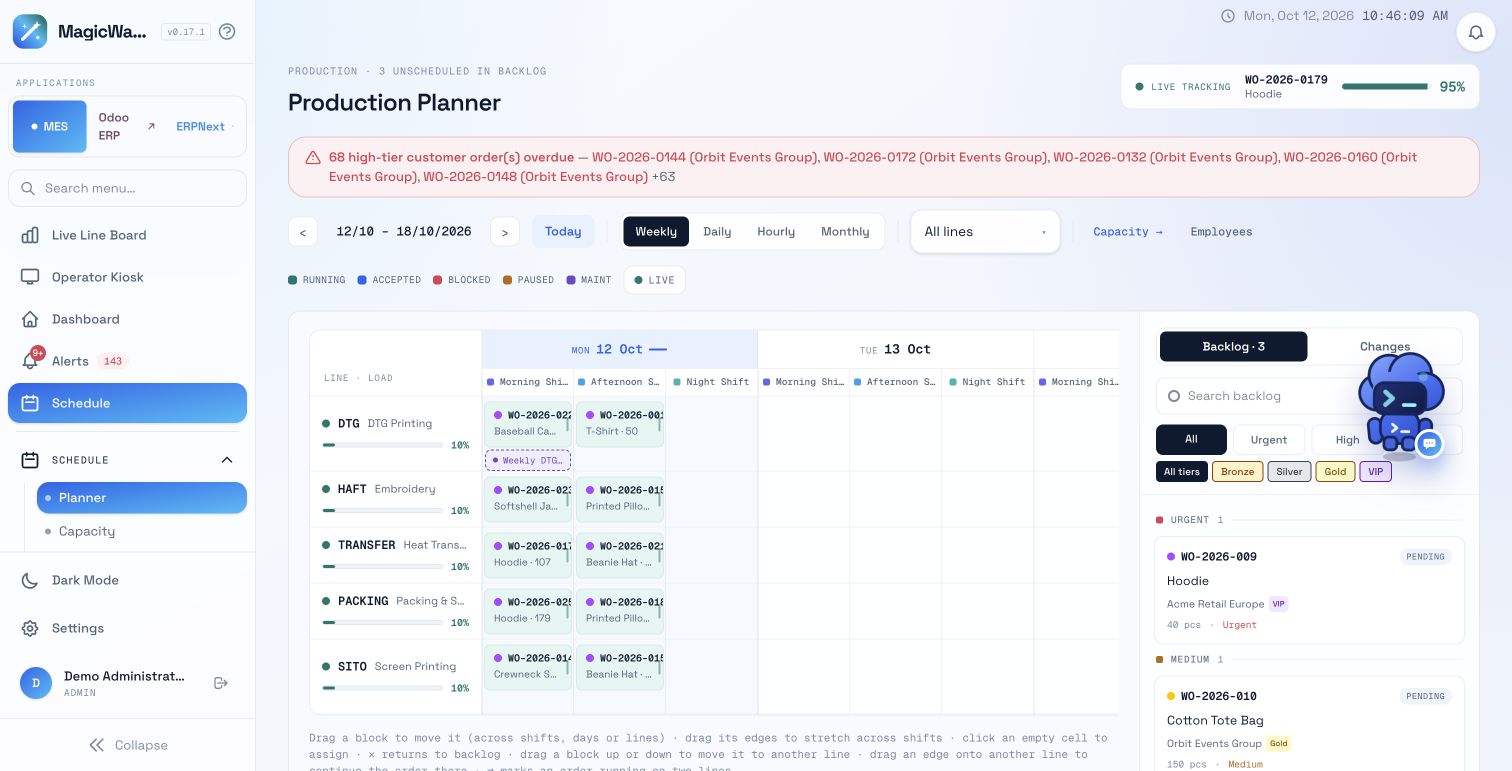
Bring the work-order backlog, scheduled production and maintenance into the same view. Review capacity, workforce and material context before deciding what should run next.
Email the founders · tell us your production challenge
Actual MagicWand product screen · demo data · click to enlarge
01 / PRODUCTION PLANNING
Connect work orders with the schedule
The production planner brings work orders into daily, weekly, hourly and monthly views. See the scheduled line and shift beside the backlog. Orders retain their product, quantity, priority and customer context, helping planners review what should run next.
In the demo
Find a work order in the backlog, review its requirements and inspect where it fits into the line and shift structure.
02 / PRODUCTION PLANNING
Review the resources behind the plan
A schedule depends on more than the number of available hours. The planner links to capacity and employee views, while maintenance appears alongside production work. Material availability and reservations provide additional readiness context for the team to review.
In the demo
Check line capacity, maintenance and workforce coverage, then inspect material readiness for the work being planned.
03 / PRODUCTION PLANNING
Bring execution back into planning
The line board compares production with the shift plan. When progress changes, Shift Outlook and the constraint views provide context for reassignment or rescheduling. Governed intelligence proposals separate a possible change from the human decision to execute it.
In the demo
Compare the schedule with production progress. Review the effect of a proposed change on eligible lines, materials and due dates before approving it.
FOLLOW THE OPERATING QUESTION
What we’ll walk through.
01
Review the backlog
Find the work order and its product, quantity, priority and customer context.
02
Inspect the schedule
Review the scheduled line and shift alongside other work and maintenance.
03
Check readiness
Inspect capacity, workforce and material context for the planned work.
04
Review a proposed change
When progress changes, inspect the forecast and recovery proposal before your team approves a response.
BRING AN EXAMPLE TO YOUR DEMO
Start with the process you use today.
We’ll review your current process, demonstrate the relevant product views and discuss data and connection requirements. You can describe the records you use; sample data is optional.
These are discussion inputs, not a complete integration specification or a fixed implementation promise.
A few example orders
Product, quantity, due date and priority for the work being planned.
Lines and shifts
Where each order can run and the shift structure used in your factory.
Capacity and maintenance context
The line availability and planned maintenance your team currently considers.
Readiness records
How material reservations, workforce coverage and production progress feed your planning conversation.
BUYER QUESTIONS
Before your product demo.
Can we schedule work across lines and shifts?
The production planner supports work-order scheduling across the factory’s line and shift structure. Its views connect scheduled work, maintenance and the backlog.
Does MagicWand replace our ERP?
MagicWand focuses on manufacturing execution and factory operations. Assess the data mapping and enterprise integration approach against your ERP during a product walkthrough.
Are recovery schedule changes automatic?
Factory intelligence can prepare rescheduling proposals for review. Proposed changes and executed changes are distinct stages, with human approval in the governed workflow.
What should we prepare for a planning demo?
A few example work orders, their priorities and due dates, plus your line, shift and maintenance structure. We can use demo data to discuss how the views relate to your current planning process.
How do we review a changed order priority?
Start with the work order’s quantity, priority and customer context, then review its scheduled line and shift alongside the backlog and readiness evidence.
Is the planner a complete MRP or automatic optimization system?
This page describes the evidenced work-order, line and shift planning workflow. Bring any requirements for purchasing, material-requirements calculations or automatic optimization into the fit discussion; those capabilities should not be assumed from the schedule view.
Describe the order priorities or shift changes your team keeps revisiting. We’ll show the planner and readiness views, then discuss your current systems and the data requirements.